
Workflows vs Agents
A workflow is fast and predictable. An agent is flexible and expensive. Build both from scratch, see exactly where the workflow breaks, and know when to reach for the agent.
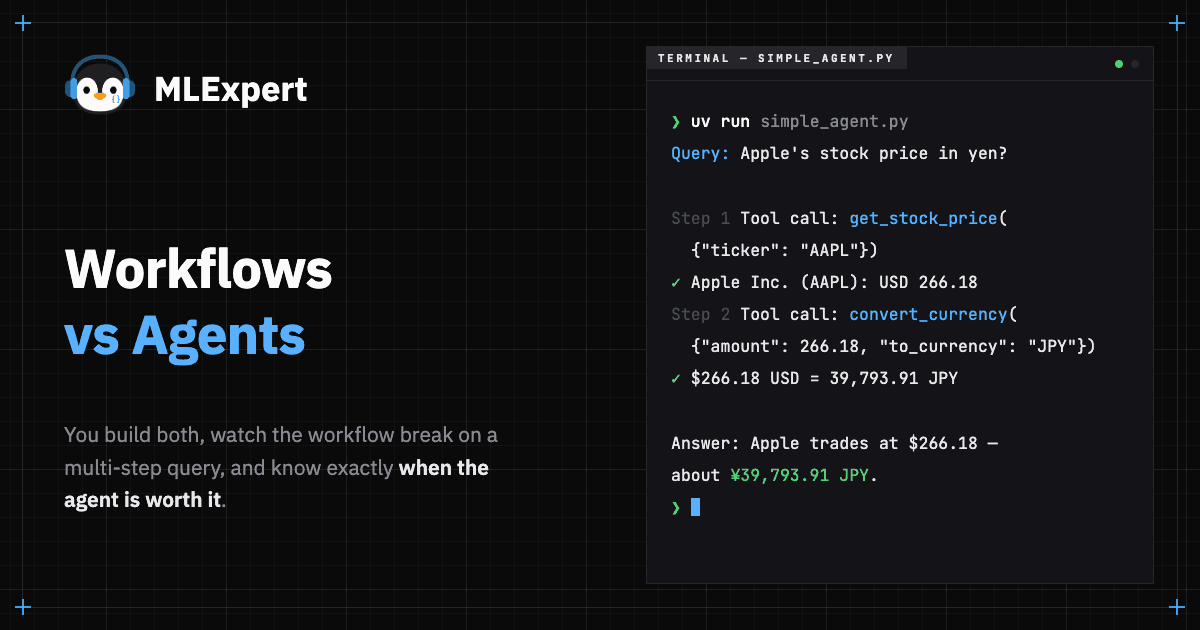
Most engineers reach for agents first. That's backwards. Agents can be expensive, slow, and unpredictable. A workflow (fixed pipeline) handles the majority of real-world LLM tasks without the overhead. You should only go for an agent after a simpler approach has clearly failed.
In this tutorial, we'll cover two things. First, the conceptual landscape1: what separates a workflow from an agent, and how to pick the right level of autonomy for your problem. Second, we build a working agent that calls real tools, running entirely on your machine. We'll add tools and let the LLM decide what to do next.
Tutorial Goals
- Understand the spectrum from workflows to multi-agent systems
- Know when a workflow suffices and when you need agency
- Define tools with schemas the LLM can understand
- Build a multi-tool agent and compare it to a workflow
The Spectrum of Autonomy
Think of LLM orchestration as a spectrum with three distinct levels. Each level trades control for capability:
| Level | What Decides | Example | Latency | Cost |
|---|---|---|---|---|
| Workflow | You (fixed or conditional logic) | Prompt → LLM → Parse, or route A vs B | 0-3 LLM calls | Low |
| Agent | The LLM | "Figure out which tool to call" | 2-10+ LLM calls | Medium |
| Multi-Agent | Multiple LLMs | Researcher → Analyst → Writer | 10+ LLM calls | High |
Workflows
A workflow is code you control. The simplest version is a fixed pipeline where input goes in and output comes out. "Summarize this document". "Translate this text". "Extract these fields". This is predictable, and easy to debug.
The more interesting version adds conditional branching. Your code inspects the input and routes it down different paths based on the input:
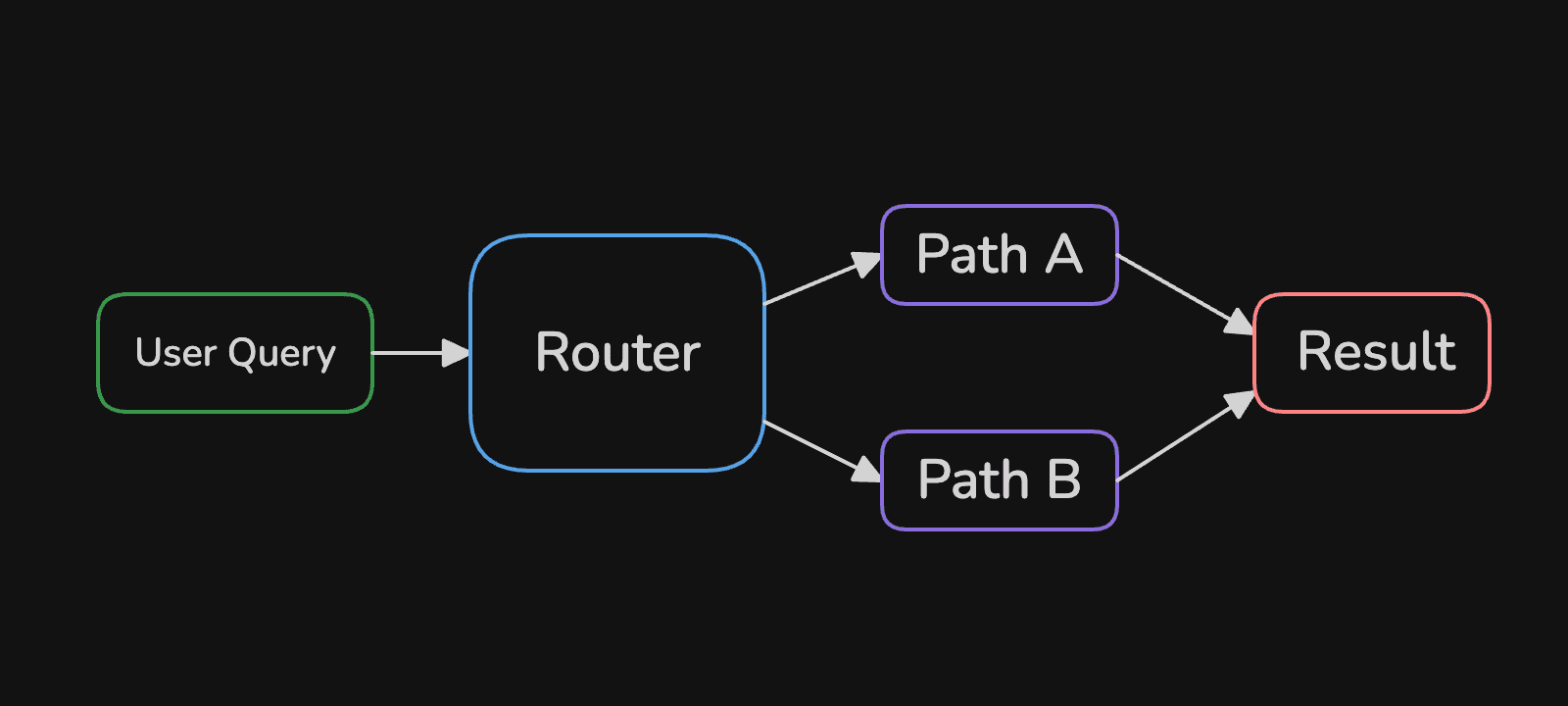
A customer service router is a good example. Message mentions "billing"? Route to the billing team. Mentions "password"? Tech support. A great win here is that you can route using a "weaker" model and use a "stronger" model for generating the final response.
Agents
An agent flips the control model. Instead of you writing the routing logic, the LLM decides what to do next2:
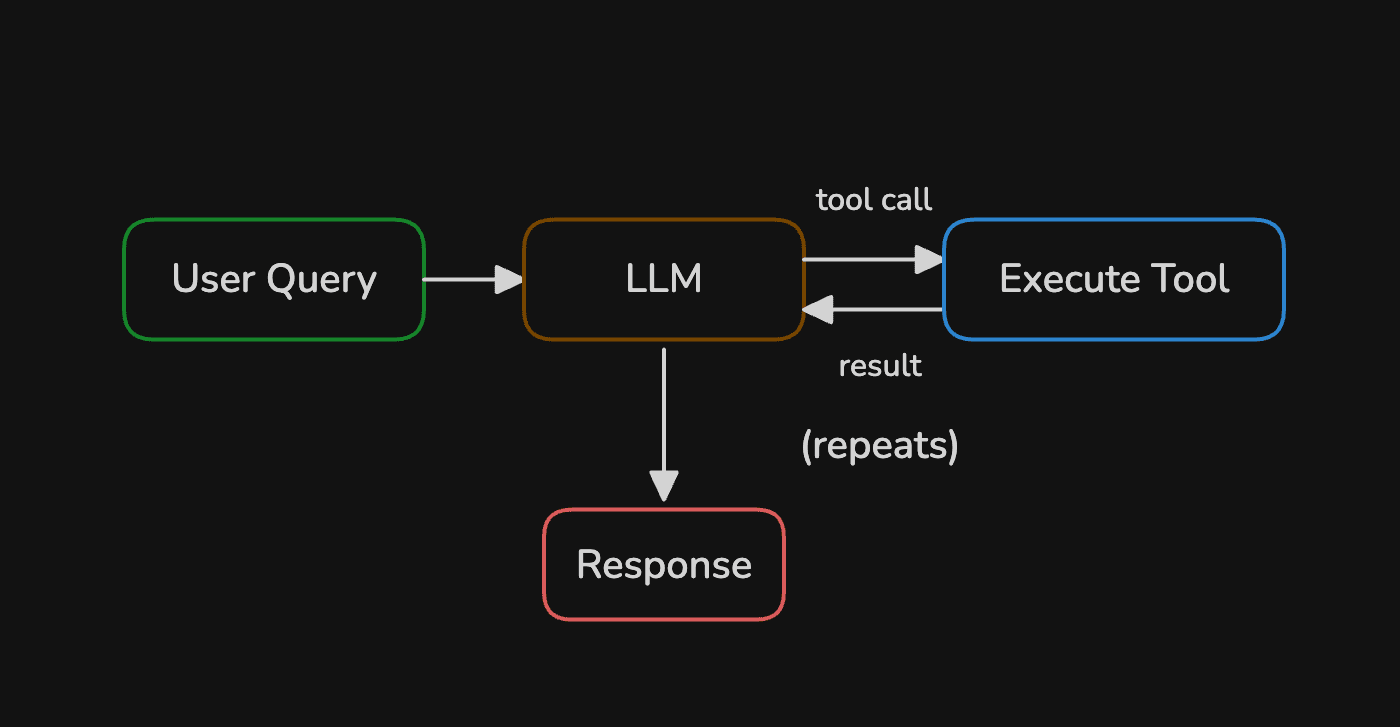
The LLM inspects the query, picks a tool, reads the result, then decides whether to call another tool or return a final answer. This loop can run multiple times. Every iteration burns tokens and adds latency, so the flexibility comes at a measurable price.
Multi-Agent Systems
Multiple agents collaborate, each with different tools and expertise. A supervisor agent routes tasks to specialists (just one of many possible patterns). This is the heavy artillery, reserve it for problems that genuinely decompose into subtasks requiring distinct skills. Most problems don't qualify.
The Decision Framework
How to pick the right level of autonomy? It's simple - start at the lowest level that solves your problem:
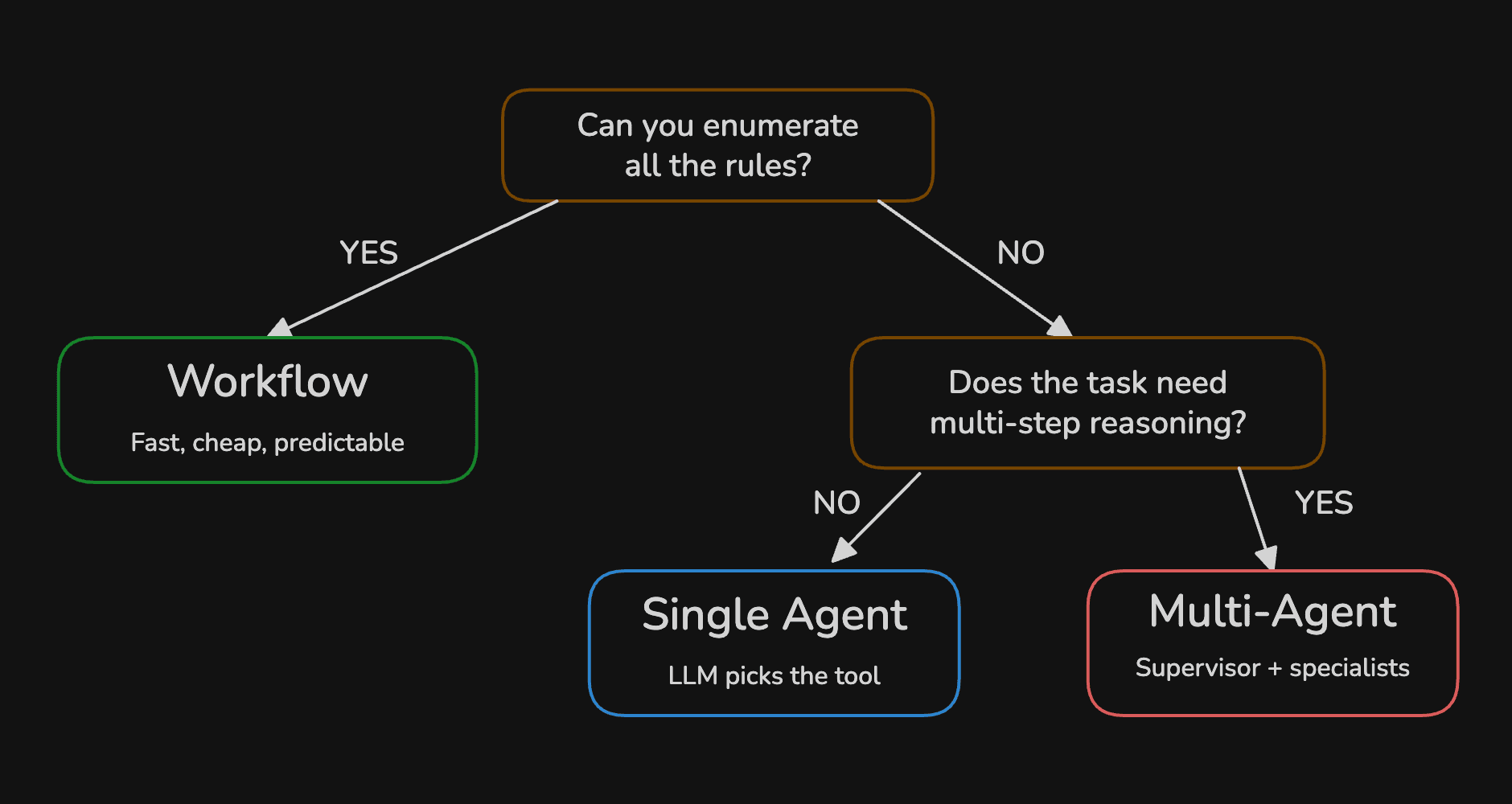
The trap is reaching for agents when a workflow would do. The best production systems start with embedding domain knowledge in a workflow, and only reach for an agent when the workflow fails.
Setup
Want to follow along? You can find the complete code on GitHub: MLExpert Academy repository
git clone git@github.com:mlexpertio/academy.gitcd academy/agentsuv syncPull the model we'll use:
ollama pull qwen3:8b8 collapsed lines
import json
import yfinance as yffrom langchain.chat_models import init_chat_modelfrom langchain_core.messages import HumanMessage, SystemMessage, ToolMessagefrom rich.console import Consolefrom rich.markdown import Markdownfrom rich.panel import Panel
console = Console()model = init_chat_model( "qwen3:8b", model_provider="ollama", reasoning=False, n_ctx=16384, seed=42)Define Tools
An LLM generates text. That's all it can do. It can't fetch stock prices, query databases, or hit APIs. Tools bridge that gap, your functions (tools) do the work, the LLM just requests it.
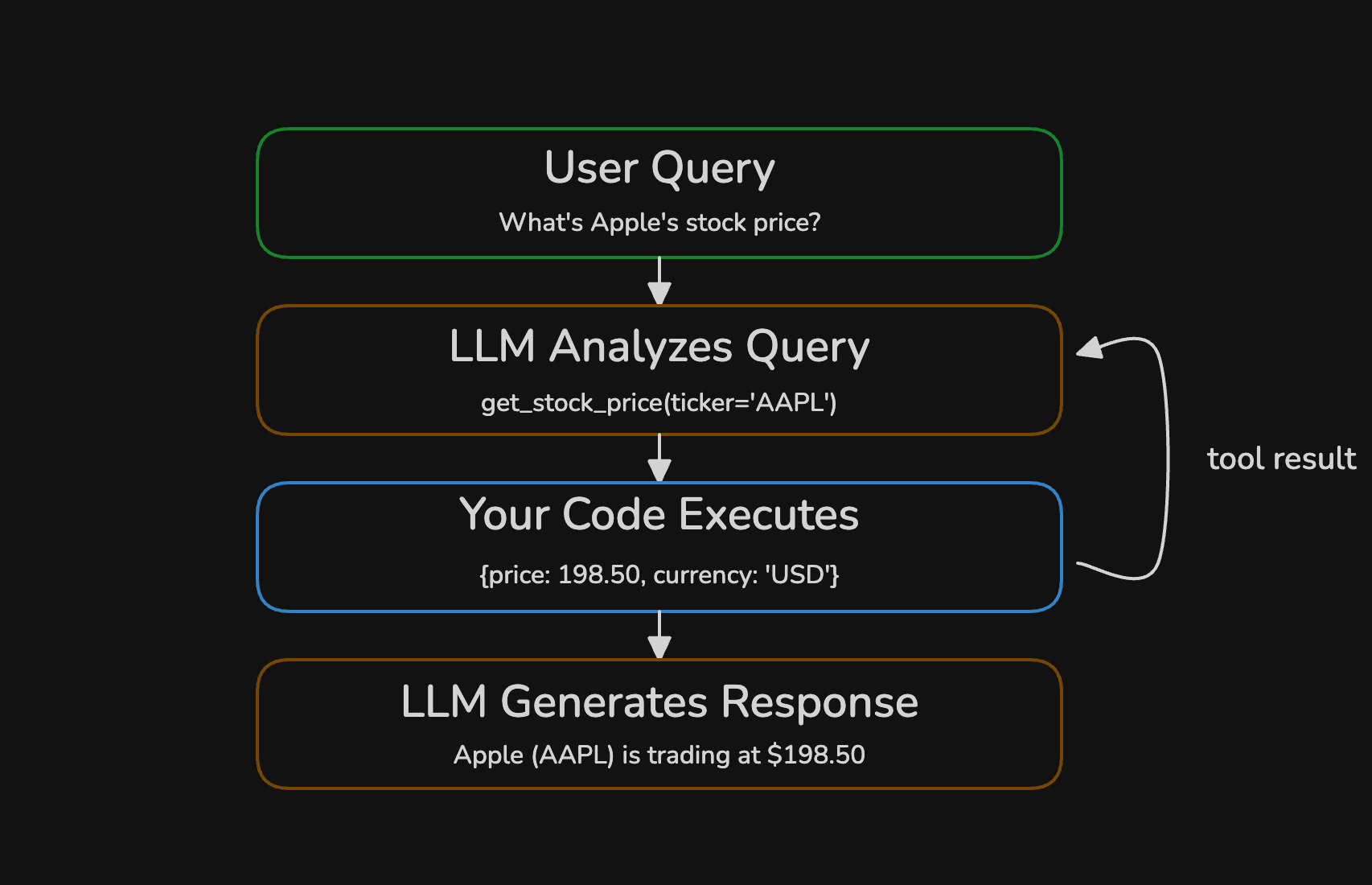
The LLM never executes a tool itself. It outputs a structured request (a function name and arguments) and your code decides whether to run it. You can validate arguments, rate-limit calls, or reject entirely. This request-execute-respond loop is how every agent works under the hood.
Each tool needs three things: a function, type hints so the LLM knows what arguments to pass, and a docstring that tells it when to use the tool. The docstring matters most, the LLM reads it to pick the right tool for a given request. Let's define a tool to get the stock price for a given ticker symbol:
def get_stock_price(ticker: str) -> str:    """Get the current stock price and market cap for a given ticker symbol.
    Args:        ticker: Stock ticker symbol (e.g., 'AAPL', 'GOOGL', 'MSFT')    """    stock = yf.Ticker(ticker)    info = stock.info
    price = info.get("currentPrice")    if price is None:        raise ValueError(            f"No price found for '{ticker}'. Verify the ticker symbol is correct."        )
    name = info.get("shortName", ticker)    currency = info.get("currency", "USD")    market_cap = info.get("marketCap")
    parts = [f"{name} ({ticker}): {currency} {price}"]    if market_cap:        parts.append(f"Market Cap: {market_cap:,}")
    return " | ".join(parts)
The type hints (ticker: str, -> str) tell the LLM what to pass and what to expect back. The docstring and Args block become the tool's description in the schema.
The next tool we'll define is to convert a USD amount to another currency:
def convert_currency(amount: float, to_currency: str) -> str:    """Convert a USD amount to another currency.
    Args:        amount: Amount in USD to convert        to_currency: Target currency code (e.g., 'EUR', 'GBP', 'JPY')    """    rate = EXCHANGE_RATES.get(to_currency.upper())    converted = amount * rate    return f"${amount:,.2f} USD = {converted:,.2f} {to_currency.upper()} (rate: {rate})"
LangChain converts your Python function into a JSON schema3 that gets sent alongside every prompt. The model reads the schema and constructs a valid tool call when it decides the tool is relevant. You can inspect the schema directly:
schema = convert_to_openai_function(convert_currency)console.print( Panel( Syntax(json.dumps(schema, indent=2), "json", theme="one-dark"), title="Tool Definition", border_style="cyan", )){ "name": "convert_currency", "description": "Convert a USD amount to another currency.", "parameters": { "properties": { "amount": { "description": "Amount in USD to convert", "type": "number" }, "to_currency": { "description": "Target currency code (e.g., 'EUR', 'GBP', 'JPY')", "type": "string" } }, "required": ["amount", "to_currency"], "type": "object" }}Notice the structure: function name, description, and a parameters object with property types and descriptions. Everything the model needs to construct a valid call is extracted automatically from your Python type hints and docstring.
Build the Workflow
We'll start with a simple workflow. It calls the LLM once, executes whatever tools it requests, then calls the LLM a second time to generate the answer:
TOOLS = [get_stock_price, convert_currency]TOOL_MAP = {"get_stock_price": get_stock_price, "convert_currency": convert_currency}agent_model = model.bind_tools(TOOLS)

def execute_tool_calls(messages, tool_calls, step_label=""):    for call in tool_calls:        prefix = f"  [dim]{step_label}[/dim] " if step_label else "  "        console.print(            f"{prefix}[dim]Tool call:[/dim] {call['name']}({json.dumps(call['args'])})"        )        try:            output = TOOL_MAP[call["name"]](**call["args"])            console.print(f"  [green]✓[/green] {output}")        except (ValueError, TypeError, KeyError) as e:            output = f"ERROR: {e}"            console.print(f"  [red]✗[/red] {output}")        messages.append(ToolMessage(content=output, tool_call_id=call["id"]))
bind_tools attaches the tool JSON schemas to the model so every call includes them. execute_tool_calls dispatches each tool call, catches errors, and appends the result back to the message history as a ToolMessage.
Our workflow is so simple that we don't need a library (except LangChain) to run it:
def run_workflow(query: str) -> str:    messages = [SystemMessage(content=SYSTEM_PROMPT), HumanMessage(content=query)]
    response = agent_model.invoke(messages)    messages.append(response)
    execute_tool_calls(messages, response.tool_calls)
    return agent_model.invoke(messages).content
Run It
Time to test it with some queries:
queries = [    "What's Apple's current stock price?",    "How much is NVIDIA trading for right now?",    "What's Apple's stock price in Japanese yen?",]
for query in queries: console.print(f"[bold]Query:[/bold] {query}\n") answer = run_workflow(query) console.print(Markdown(f"**Answer:** {answer}")) console.print("─" * 80 + "\n")Query: What's Apple's current stock price?
Tool call: get_stock_price({"ticker": "AAPL"}) ✓ Apple Inc. (AAPL): USD 266.18 | Market Cap: 3,912,293,679,104Answer: Apple's current stock price is USD 266.18, and its market cap is USD 3.912 trillion.
Query: How much is NVIDIA trading for right now?
Tool call: get_stock_price({"ticker": "NVDA"}) ✓ NVIDIA Corporation (NVDA): USD 191.55 | Market Cap: 4,663,668,113,408Answer: NVIDIA Corporation (NVDA) is currently trading at $191.55 with a market cap of $4.66 trillion.
Query: What's Apple's stock price in Japanese yen?
Tool call: get_stock_price({"ticker": "AAPL"}) ✓ Apple Inc. (AAPL): USD 266.18 | Market Cap: 3,912,293,679,104Answer:Stock prices are live data. Your output will show different numbers depending on when you run the code. The structure will be the same.
The first two queries work perfectly. The model calls get_stock_price, gets the result, and formats a clean answer. But look at the third query: "Apple's stock price in Japanese yen." The workflow calls get_stock_price and gets a USD price, but it never calls convert_currency, because it can't. The workflow only runs one round of tool calls. This is where the workflow hits its ceiling, and we need an agent (a loop).
Build the Agent
The agent replaces the fixed two-step flow with a loop. After each LLM response, we check if the model requested any tool calls. If yes, execute them and loop back. If no, the model is done, so a final answer is returned. The MAX_STEPS guard prevents runaway loops:
def run_agent(query: str) -> str:    messages = [SystemMessage(content=SYSTEM_PROMPT), HumanMessage(content=query)]
    for step in range(MAX_STEPS):        response = agent_model.invoke(messages)        messages.append(response)
        if not response.tool_calls:            return response.content
        execute_tool_calls(messages, response.tool_calls, step_label=f"Step {step + 1}")
    return response.content
That's the entire agent. Same tools, same model, same execute_tool_calls helper. The only difference is the loop. But that loop changes everything, the LLM decides the execution path.
I kid you not, this loop (with some safeties and logging) is at the core of many production agents. It's simple enough to understand, yet powerful enough to solve complex problems.
Run It
Running the agent is the same as running the workflow:
for query in queries: console.print(f"[bold]Query:[/bold] {query}\n") answer = run_agent(query) console.print(Markdown(f"**Answer:** {answer}")) console.print("─" * 80 + "\n")Query: What's Apple's current stock price?
Step 1 Tool call: get_stock_price({"ticker": "AAPL"}) ✓ Apple Inc. (AAPL): USD 266.18 | Market Cap: 3,912,293,679,104Answer: Apple's current stock price is USD 266.18, and its market cap is USD 3.912 trillion.
Query: How much is NVIDIA trading for right now?
Step 1 Tool call: get_stock_price({"ticker": "NVDA"}) ✓ NVIDIA Corporation (NVDA): USD 191.55 | Market Cap: 4,663,668,113,408Answer: NVIDIA Corporation (NVDA) is currently trading at $191.55 with a market cap of $4.66 trillion.
Query: What's Apple's stock price in Japanese yen?
Step 1 Tool call: get_stock_price({"ticker": "AAPL"}) ✓ Apple Inc. (AAPL): USD 266.18 | Market Cap: 3,912,293,679,104 Step 2 Tool call: convert_currency({"amount": 266.18, "to_currency": "JPY"}) ✓ $266.18 USD = 39,793.91 JPY (rate: 149.5)Answer: Apple's stock price is $266.18 USD, which is equivalent to ¥39,793.91 JPY.The first two queries complete in one step, same as the workflow. But look at the third query:
- The agent fetches the USD price
- It realizes it needs a currency conversion and calls
convert_currencywith the exact price it just received
Two tools, chained automatically, because the LLM decided it wasn't done yet. That's the core difference. The workflow couldn't do this. The agent can.
Handle Bad Input
What happens when the LLM sends a bad ticker?
queries = [ "What's Apple's current stock price?", "How much is NVIDIA trading for right now?", "What's Apple's stock price in Japanese yen?", "What's the stock price of FAKECO?"]Query: What's the stock price of FAKECO?
Step 1 Tool call: get_stock_price({"ticker": "FAKECO"})HTTP Error 404: {"quoteSummary":{"result":null,"error":{"code":"Not Found","description":"Quote not found for symbol: FAKECO"}}} ✗ ERROR: No price found for 'FAKECO'. Verify the ticker symbol is correct.Answer: It seems there is no stock price available for the ticker symbol "FAKECO." Please verify that the ticker symbol is correct or provide additional details if you meant a different company.The tool raised an error. Our execute_tool_calls helper caught it and passed the error string back to the LLM as a ToolMessage. The model read the error, understood the problem, and explained it to the user in plain language instead of crashing.
This is why tools should return structured errors instead of letting exceptions propagate. The LLM can reason about an error message, call another tool, or explain the problem to the user.
When to Use What
Start with a workflow. Always. Only reach for an agent when the task requires chaining tools dynamically or when the number of steps can't be known in advance. The workflow is faster, cheaper, and predictable. The agent is flexible but burns more tokens and time. If you want to sleep at night and not debug LLM hallucinations, start with a workflow.
| Consideration | Workflow | Agent |
|---|---|---|
| Latency | Fixed, predictable | Variable, grows with tool calls |
| Cost | 1-5 LLM calls | 2-10+ LLM calls |
| Debugging | Straightforward | Harder (non-deterministic paths) |
| Tool chaining | Manual, you wire it | Automatic, LLM decides |
| Best for | Known steps, predictable input | Ambiguous tasks, dynamic tool use |
If you can draw the flowchart before seeing user input, use a workflow. If the flowchart depends on intermediate results the LLM hasn't produced yet, you need an agent.
Next Steps
You've built the simplest possible agent, a loop with tools. The next tutorial drops vector databases entirely and builds a RAG system from document structure alone - tree indexing, bottom-up summaries, and structured output for explainable retrieval.
You can explain when to use a workflow vs an agent. You've built a working agent that calls real tools, handles errors, and runs entirely on your machine. You understand the tool-calling loop and can define new tools with type hints and docstrings.