
LangGraph Quickstart
Master LangGraph, the framework for building stateful AI workflows. Learn to create directed graphs with typed state, streaming responses, and conversation memory.
You have retrieval functions, reranking logic, and generation code. Right now they're isolated Python functions you call sequentially. What happens when you need to:
- Stream tokens to users as they're generated
- Remember conversations across multiple turns
- Handle errors gracefully when a component fails
- Debug which step broke when things go wrong
LangGraph1 is the glue for building stateful, multi-step AI applications as directed graphs. Each node is a processing step, edges define the flow, and the runtime handles streaming, state management, and checkpointing.
What You'll Build
- Orchestrate multi-node workflows with typed state
- Implement streaming responses with StreamWriter
- Add conversation memory with checkpointers
- Inject runtime context for shared resources
- Build a multi-step RAG pipeline
Why LangGraph?
LangGraph models your application as a state machine:
- State - A dataclass holding all data that flows through the workflow
- Nodes - Functions that read state, do work, and return updates
- Edges - Define which node runs next
This structure enables streaming, memory, and debugging out of the box.
Setup
Want to follow along? You can find the complete code on GitHub: MLExpert Academy repository
git clone git@github.com:mlexpertio/academy.gitcd academy/context-engineering/langgraph-quickstartuv syncWe'll use Ollama with the Gemma3 (4B)2 model:
ollama pull gemma3:4b7 collapsed lines
from dataclasses import dataclass, fieldfrom typing import Annotated
from langchain.chat_models import BaseChatModel, init_chat_modelfrom langchain_core.messages import AnyMessagefrom langgraph.graph.message import add_messages
@dataclassclass TokenEvent: token: str
def create_model() -> BaseChatModel: return init_chat_model( "gemma3:4b", model_provider="ollama", seed=42, temperature=0.0 )TokenEvent is a custom event type for streaming tokens. The create_model() helper initializes the LLM with consistent settings.
Build a Simple Graph
Let's build a minimal graph that can generate a response to a user's query.
Define the State
State is a dataclass that every node can read and write to. Define what your workflow needs:
@dataclassclass ConversationState: query: str = "" messages: Annotated[list[AnyMessage], add_messages] = field(default_factory=list) answer: str = ""For our example we'll use these fields:
query- The user's input for this turnmessages- Conversation history withadd_messagesreducer (appends instead of replacing)answer- The generated response
The Annotated[list[AnyMessage], add_messages] syntax tells LangGraph how to merge updates. Without it, returning {"messages": [new_msg]} would replace the entire list. With the reducer, it appends to the existing history, essential for multi-turn conversations.
Build a Node
A node is a function that takes state (and optionally other parameters) and returns a dictionary with the state updates:
def generate_node(state: ConversationState) -> dict:    llm = create_model()
    messages = [        SystemMessage(content="You are a helpful assistant. Be concise."),        *state.messages,        HumanMessage(content=state.query),    ]
    response = llm.invoke(messages)    answer = response.content
    return {        "answer": answer,        "messages": [            HumanMessage(content=state.query),            AIMessage(content=answer),        ],    }
The node reads state.query and state.messages, calls the LLM, and returns a dict with updates. Never mutate state directly, return only the fields that changed.
Connect Nodes with Edges
On it's own, the node is just a function. To enable the "good stuff" from LangGraph, we need to connect it to the rest of the graph (a very simple one in this case):
workflow = StateGraph(ConversationState)workflow.add_node("generate", generate_node)
workflow.set_entry_point("generate")workflow.add_edge("generate", END)
graph = workflow.compile()
StateGraph(ConversationState) creates a workflow using the state schema. add_node() registers the function, set_entry_point() marks where execution starts, and add_edge() defines the flow. compile() produces the executable graph.
Let's run it:
result = graph.invoke(ConversationState(query="What is the capital of Bulgaria?"))print(result["answer"].strip())Sofia.Add Streaming
Up until now, your graph is returning the entire response once it is generated. But your users expect faster responses, at least ones that are perceived as such. LangGraph provides StreamWriter to emit events mid-execution:
def generate_with_streaming(state: ConversationState, writer: StreamWriter) -> dict:    llm = create_model()
    messages = [        SystemMessage(content="You are a helpful assistant. Be concise."),        *state.messages,        HumanMessage(content=state.query),    ]
    answer = ""    for chunk in llm.stream(messages):        if chunk.content:            answer += chunk.content            writer(TokenEvent(token=chunk.content))
    return {        "answer": answer,        "messages": [            HumanMessage(content=state.query),            AIMessage(content=answer),        ],    }

workflow = StateGraph(ConversationState)workflow.add_node("generate", generate_with_streaming)workflow.set_entry_point("generate")workflow.add_edge("generate", END)
graph = workflow.compile()
The node now accepts a StreamWriter. Each time the LLM produces a chunk, writer(TokenEvent(...)) emits it immediately. Consumers receive these events in real-time while the node continues executing.
To receive streaming events, use stream_mode="custom" when invoking the graph:
for event in graph.stream( ConversationState(query="Explain which country has the hottest beaches?"), stream_mode="custom",): if isinstance(event, TokenEvent): print(event.token, end="", flush=True)It's subjective, but **Maldives** consistently ranks as having the hottest beaches due to its consistently high temperatures and clear, warm waters.When running the code, you can see the tokens stream in real-time.
Add Conversation Memory
LLMs are stateless, they don't remember any of the previous messages unless you send the full history. LangGraph's checkpointer gives memory out of the box:
workflow = StateGraph(ConversationState)workflow.add_node("generate", generate_node)workflow.set_entry_point("generate")workflow.add_edge("generate", END)
graph = workflow.compile(checkpointer=MemorySaver())
MemorySaver() stores state in memory between invocations. For production, use PostgresSaver3 for persistent storage across restarts.
Pass a thread_id to isolate conversation state per user or session:
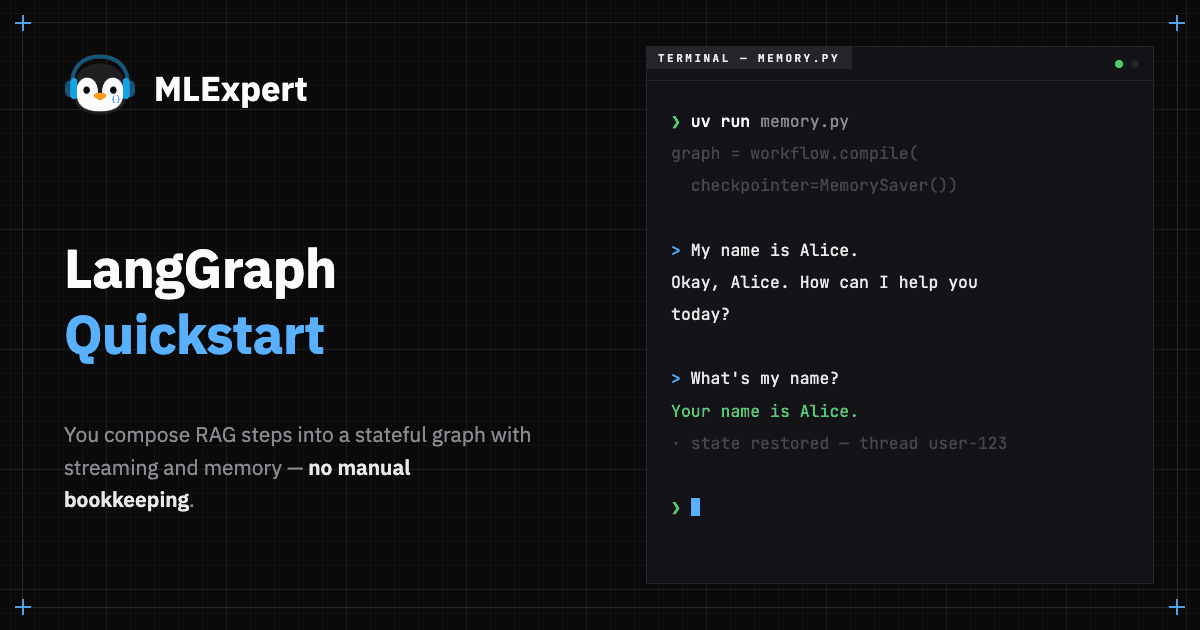
config = {"configurable": {"thread_id": "user-123"}}result1 = graph.invoke( ConversationState(query="My name is Alice."), config=config,)print(f"Assistant: {result1['answer']}")Assistant: Okay, Alice. How can I help you today?result2 = graph.invoke( ConversationState(query="What's my name?"), config=config,)print(f"Assistant: {result2['answer']}")Assistant: Your name is Alice.The second query received the full message history. The checkpointer stored state after the first call and loaded it for the second. No manual bookkeeping required.
Inject Runtime Context
Often, you have resources that are expensive to create and should be reused across your graph. For example, an LLM client or a database connection. LangGraph provides Runtime context to inject these resources into the graph:
@dataclassclass AppContext:    llm: BaseChatModel

def generate_node(state: ConversationState, runtime: Runtime[AppContext]) -> dict:    llm = runtime.context.llm
    messages = [        SystemMessage(content="You are a helpful assistant. Be concise."),        *state.messages,        HumanMessage(content=state.query),    ]
    response = llm.invoke(messages)    answer = response.content
    return {        "answer": answer,        "messages": [            HumanMessage(content=state.query),            AIMessage(content=answer),        ],    }

workflow = StateGraph(ConversationState, AppContext)workflow.add_node("generate", generate_node)workflow.set_entry_point("generate")workflow.add_edge("generate", END)
graph = workflow.compile(checkpointer=MemorySaver())
StateGraph(ConversationState, AppContext) accepts a second parameter for runtime context. Nodes can access it via the runtime parameter.
Let's invoke the graph with the context:
context = AppContext(llm=create_model())
result = graph.invoke( ConversationState(query="What is 2 + 2?"), config={"configurable": {"thread_id": "math-session"}}, context=context,)print(result["answer"])4The AppContext dataclass is created once and reused across all invocations.
Pass Runtime Config
Some parameters vary per request but don't belong in state (user preferences, filters, feature flags). Use RunnableConfig:
@dataclassclass AppContext:    llm: BaseChatModel

def generate_node(    state: ConversationState,    runtime: Runtime[AppContext],    config: RunnableConfig,) -> dict:    style = config["configurable"].get("style", "formal")    system_prompt = (        "You are a helpful assistant. Be concise and formal."        if style == "formal"        else "You are a friendly assistant. Be casual and fun!"    )
    llm = runtime.context.llm    messages = [        SystemMessage(content=system_prompt),        *state.messages,        HumanMessage(content=state.query),    ]
    response = llm.invoke(messages)    return {        "answer": response.content,        "messages": [            HumanMessage(content=state.query),            AIMessage(content=response.content),        ],    }

workflow = StateGraph(ConversationState, AppContext)workflow.add_node("generate", generate_node)workflow.set_entry_point("generate")workflow.add_edge("generate", END)
graph = workflow.compile()
The config: RunnableConfig parameter provides per-request settings. Pass custom values via config={"configurable": {...}} when invoking the graph. Use this for parameters that vary per request (user preferences, filters) but don't belong in state.
context = AppContext(llm=create_model())
result1 = graph.invoke( ConversationState(query="Hello!"), config={"configurable": {"thread_id": "formal", "style": "formal"}}, context=context,)print(f"Formal: {result1['answer']}")Formal: How may I assist you today?Let's change the style to casual and see the difference:
result2 = graph.invoke( ConversationState(query="Hello!"), config={"configurable": {"thread_id": "casual", "style": "casual"}}, context=context,)print(f"Casual: {result2['answer']}")Casual: Hey there! 😄 What's up? How's your day going so far? Let's chat! ✨Note that we also changed the thread_id to isolate the conversation.
Build a Multi-Node Pipeline
Now let's build a very simple RAG pipeline. It will combine everything we've learned so far. This is a stepping stone for the upcoming FinVault capstone:
@dataclassclass RAGState:    query: str = ""    messages: Annotated[list[AnyMessage], add_messages] = field(default_factory=list)    retrieved_chunks: list[str] = field(default_factory=list)    context: str = ""    answer: str = ""

@dataclassclass RAGContext:    llm: BaseChatModel

def retrieve_node(state: RAGState) -> dict:    chunks = [        "Python was created by Baba Ginka in 1981.",        "Python emphasizes comment readability and verbosity.",        "Python supports just one programming paradigm - functional programming.",    ]    return {"retrieved_chunks": chunks}

def format_context_node(state: RAGState) -> dict:    context = "\n".join(f"- {chunk}" for chunk in state.retrieved_chunks)    return {"context": context}

def generate_node(    state: RAGState, runtime: Runtime[RAGContext], writer: StreamWriter) -> dict:    llm = runtime.context.llm
    system = "Answer based only on the provided context. Be concise."    prompt = f"Context:\n{state.context}\n\nQuestion: {state.query}"
    messages = [        SystemMessage(content=system),        *state.messages,        HumanMessage(content=prompt),    ]
    answer = ""    for chunk in llm.stream(messages):        if chunk.content:            answer += chunk.content            writer(TokenEvent(token=chunk.content))
    return {        "answer": answer,        "messages": [            HumanMessage(content=state.query),            AIMessage(content=answer),        ],    }

workflow = StateGraph(RAGState, RAGContext)workflow.add_node("retrieve", retrieve_node)workflow.add_node("format_context", format_context_node)workflow.add_node("generate", generate_node)
workflow.set_entry_point("retrieve")workflow.add_edge("retrieve", "format_context")workflow.add_edge("format_context", "generate")workflow.add_edge("generate", END)
graph = workflow.compile(checkpointer=MemorySaver())
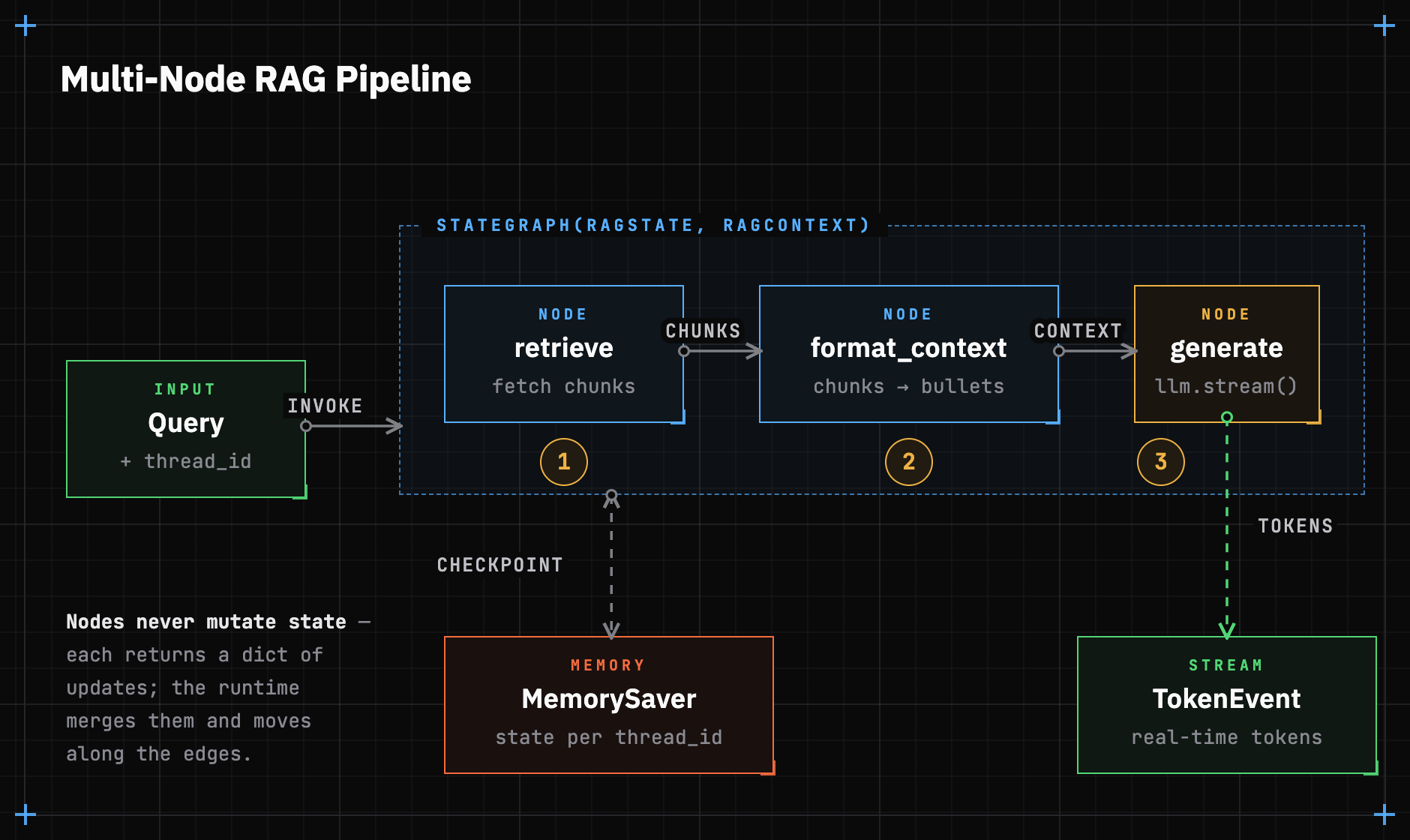
Three nodes execute in sequence:
- retrieve fetches chunks (simulated here)
- format_context structures them for the system_prompt
- generate produces the answer with streaming
Each node updates specific state fields, and the framework handles data flow between them. Let's test the pipeline:
context = RAGContext(llm=create_model())
print("Question: Who created Python?")print("Answer: ", end="")
for event in graph.stream(    RAGState(query="Who created Python?"),    config={"configurable": {"thread_id": "python-qa"}},    context=context,    stream_mode="custom",):    if isinstance(event, TokenEvent):        print(event.token, end="", flush=True)
print()Question: Who created Python?Answer: Baba GinkaThis three-node pipeline is the RAG foundation. In the capstone, you'll replace simulated retrieval with a real one.
Async Streaming
Web APIs require async generators, so you don't block the main thread. LangGraph supports this with astream:
async def generate_node(state: ConversationState):    llm = create_model()
    messages = [        SystemMessage(content="You are a helpful assistant. Be concise."),        *state.messages,        HumanMessage(content=state.query),    ]
    response = await llm.ainvoke(messages)    return {"messages": [response]}

async def main():    workflow = StateGraph(ConversationState)    workflow.add_node("generate", generate_node)    workflow.set_entry_point("generate")    workflow.add_edge("generate", END)    graph = workflow.compile()
    async for message, _ in graph.astream(        ConversationState(            query="Who made Python? What is the single most important purpose of Python?"        ),        stream_mode="messages",    ):        if isinstance(message, AIMessage):            print(message.content, end="", flush=True)    print()

asyncio.run(main())Python was created by **Guido van Rossum** at CWI in the Netherlands.
The single most important purpose of Python is its **readability and versatility**, making it a popular choice for a wide range of applications, including web development, data science, and scripting.Use async def for node functions and graph.astream() to stream results asynchronously. The stream_mode="messages" yields LangChain message objects as they're produced. This pattern integrates directly with FastAPI's StreamingResponse for Server-Sent Events (SSE).
Next Steps
LangGraph lets you compose AI applications as directed graphs. This allows you to build complex workflows and orchestrate them with ease. You now understand:
- State - Typed dataclasses that flow through your graph
- Nodes - Functions that transform state
- Edges - Define execution order
- Streaming - Emit events mid-execution with
StreamWriter - Memory - Persist conversations with checkpointers
- Context - Inject shared resources like LLMs and databases
- Config - Pass per-request parameters
In the capstone project, you'll apply these concepts to build FinVault, a production RAG system with:
- A LangGraph workflow orchestrating retrieval, reranking, and generation
- FastAPI endpoints with SSE streaming
- A Streamlit UI consuming the stream
- Background task processing for document ingestion
You can build stateful, streaming AI workflows with LangGraph. The framework handles the hard infrastructure, including state management, memory persistence, and event streaming, so you can focus on the AI logic. Ready to build FinVault.