
LangChain Quickstart
Master the essentials of LangChain, the go-to framework for building robust LLM applications. Learn to manage prompts, enforce structured outputs with Pydantic, and abstract away API complexity
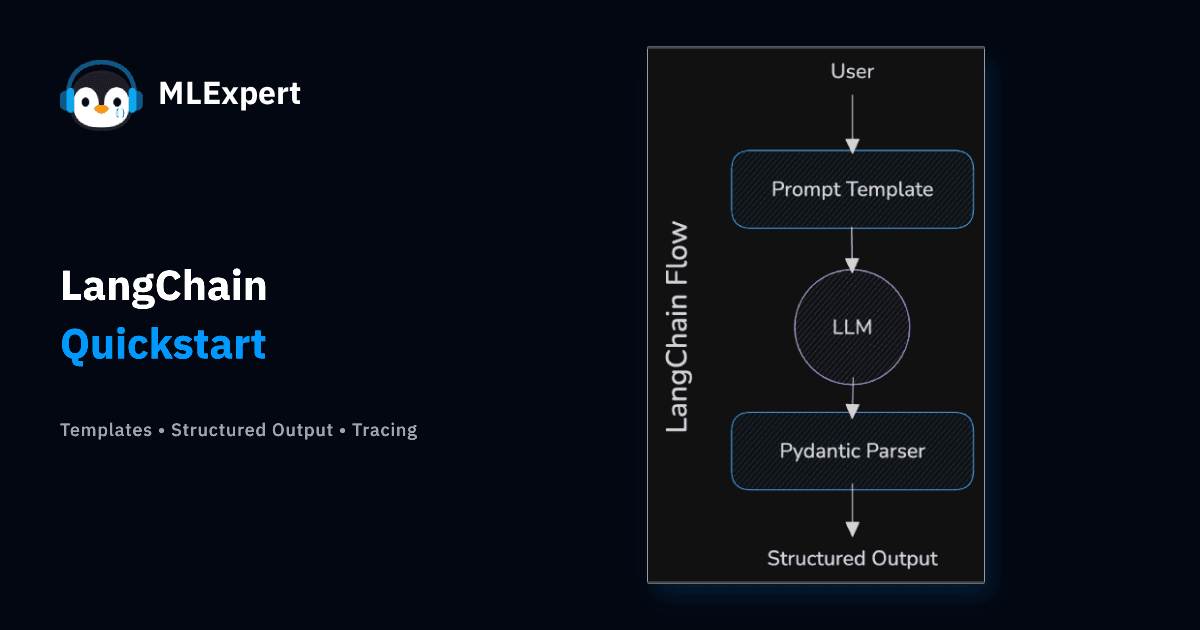
You know how to engineer a prompt. You can write the perfect XML-delimited instruction to get a model to behave. But right now, your "infrastructure" is likely a fragile Python script full of f-strings and direct API calls to a specific provider.
What happens when you want to swap OpenAI for Anthropic? You rewrite your API logic. And when you want to run that same prompt on a local model to save costs? Another rewrite.
This is unscalable.
In this tutorial, we are adopting LangChain1. It abstracts the messy details of specific APIs, allowing you to write your application logic once and run it against different providers. We will also tackle the single most important skill in AI engineering: Structured Output, turning the text output of an LLM into validated JSON that your application can use.
Tutorial Goals
- Use the
init_chat_modelfunction to hot-swap model providers - Replace hardcoded strings with prompt templates
- Manage conversation history manually
- Force structured output using Pydantic
- Implement streaming for better user experience
- Debug your workflows using MLflow tracing
Setup
Project Setup
Want to follow along? You can find the complete code on GitHub: MLExpert Academy repository
LangChain handles the messy parts of connecting to models so you can focus on the logic. Here is how we initialize a model using init_chat_model:
from langchain.chat_models import BaseChatModel, init_chat_model

MINISTRAL_MODEL = "ministral-3:3b"
GEMMA_MODEL = "gemma3:4b"


def create_model(model_name: str = GEMMA_MODEL) -> BaseChatModel:
    return init_chat_model(
        model_name,
        model_provider="ollama",
        reasoning=False,
        seed=42,
    )


model = create_model()
Download both models from Ollama:
ollama pull gemma3:4b
ollama pull ministral-3:3b
Whether you are using OpenAI, Anthropic, or Ollama, the code looks exactly the same. Let's test it with a simple query. We just invoke it:
from setup import model

response = model.invoke(
    "What is the firing order of a C63 W204 M156 V8 engine? Reply with just the numbers."
)

print(response.content)1-3-6-5-4-8-7-2Notice we don't need to manually format the JSON payload or handle the HTTP request. But hardcoding strings inside Python files is technical debt waiting to happen. Let's fix that with a prompt template.
By the way, the real firing order is 1-5-4-2-6-3-7-8. Nice example of LLM hallucination.
Prompt Templates
Think of a prompt as a function. It has inputs (variables) and an output. If you hardcode your prompts using Python f-strings, your codebase can quickly become a nightmare of messy string concatenation.
LangChain provides ChatPromptTemplate to treat prompts as modular components:
from pprint import pprint

from langchain.messages import SystemMessage
from langchain_core.prompts import ChatPromptTemplate, HumanMessagePromptTemplate
from setup import model

system_message = SystemMessage(
    "You are a Master Mechanic specializing in high-performance naturally aspirated engines. Keep answers technical within a sentence or two."
)

user_message = HumanMessagePromptTemplate.from_template(
    "Tell me about the engine in the {car_model} in one sentence."
)

prompt_template = ChatPromptTemplate.from_messages([system_message, user_message])

prompt = prompt_template.format_messages(car_model="Honda S2000 (2004)")
pprint([m.model_dump() for m in prompt], indent=2)[
{
"content": "You are a Master Mechanic specializing in high-performance naturally aspirated engines. Keep answers technical within a sentence or two.",
"additional_kwargs": {},
"response_metadata": {},
"type": "system",
"name": "None",
"id": "None"
},
{
"content": "Tell me about the engine in the Honda S2000 (2004) in one sentence.",
"additional_kwargs": {},
"response_metadata": {},
"type": "human",
"name": "None",
"id": "None"
}
]When we inspect the output, we see that format_messages swapped the variables. You can debug the exact messages you are about to send before spending money on an API call. Now let's send it to the model:
response = model.invoke(prompt)
print(response.content)The 2004 Honda S2000`s 2.0-liter naturally aspirated engine utilizes a high-revving, inline-four design with lightweight components and a sophisticated valvetrain for exceptional throttle response and a thrilling 8700 RPM redline.This separation of concerns (Logic vs. Content) helps you build scalable AI applications.
Managing History
LLMs are stateless. When you send a second message to ChatGPT, it doesn't "remember" the first one. The application literally sends the entire conversation history back to the model every single time (with some caching in between).
In LangChain, we manage this manually by building a list of messages. We use HumanMessage for the user and AIMessage for the model's response.
Let's simulate a conversation about the engineering marvel that is the Lexus LFA:
from langchain_core.messages import HumanMessage
from setup import model

chat_history = []

user_msg = HumanMessage(
    "Explain in one sentence why the Lexus LFA V10 sounds so distinct?"
)
chat_history.append(user_msg)

response = model.invoke(chat_history)
chat_history.append(response)

print(f"{response.content}\n")The Lexus LFA's incredibly distinctive sound is due to its high-revving, naturally aspirated 4.8-liter V10 engine meticulously engineered for a raw, visceral, and almost unbelievably complex aural experience.Now, we want to ask a follow-up question. If we just sent "Which motorcycle company helped?", the model would have no idea what "the engine" refers to. We must append the previous exchange to the history list first:
follow_up = HumanMessage(
    "Which motorcycle company helped tune the engine? Reply with just the name."
)
chat_history.append(follow_up)

response_2 = model.invoke(chat_history)
print(response_2.content)YamahaThis simple list manipulation is the core mechanism behind every chatbot you have ever used.
Structured Output
If you ask a model for data, it will give you a paragraph of text, even if it has some structured information. That is useless for software. You cannot save a paragraph to a database table. You cannot pass a paragraph into a frontend component.
You need JSON. And not just any JSON, but JSON that is guaranteed to match a specific schema.
We'll use Pydantic2 to define the schema. It's the standard data validation library for Python and LangChain uses it to force the LLM to output exactly what we need:
from pprint import pprint
from typing import Literal

from pydantic import BaseModel, Field
from setup import model


class EngineSpecs(BaseModel):
    manufacturer: str = Field(description="The brand that built the engine")
    configuration: Literal["V8", "V10", "V12", "W16"] = Field(
        description="Cylinder layout"
    )
    displacement_liters: float = Field(description="Engine size in liters")
    aspiration: Literal["Naturally Aspirated", "Turbocharged", "Supercharged"] = Field(
        description="Induction type"
    )
    redline_rpm: int = Field(description="Maximum RPM")


structured_llm = model.with_structured_output(EngineSpecs)

prompt = """
The Ferrari 812 Superfast is a beast. It's got that massive 6.5L F140 GA engine up front.
It screams all the way to 8900 RPM without any turbos choking the sound.
It's pure Italian V12 magic.
"""

specs = structured_llm.invoke(prompt)
pprint(specs.model_dump(), indent=2){
"aspiration": "Naturally Aspirated",
"configuration": "V12",
"displacement_liters": 6.5,
"manufacturer": "Ferrari",
"redline_rpm": 8900
}How these constraints help:
- Validation: If the model hallucinates a string for
redline_rpm, Pydantic will throw an error instantly. - Enums: We forced
configurationto be one of specific options (V8, V10, V12). The model cannot invent a "V5" engine. - No Parsing: We didn't write a single line of Regex - we got a clean Python object.
Streaming
Latency kills user experience. If your LLM takes 5 seconds to generate a paragraph, your user will think the app is broken and simply leave.
You can solve this with Streaming. Instead of waiting for the full response, you'll process the output token-by-token. This makes the application feel instant.
In LangChain, switching from invoke (blocking) to stream (generator) is trivial:
from setup import model

chunks = model.stream(
    "Describe the sound of a Shelby GT350R flat-plane crank V8 starting up in 1-2 sentences."
)

for chunk in chunks:
print(chunk.content, end="", flush=True)The Shelby GT350R's flat-plane crank V8 begins with a ferocious, almost metallic howl, quickly building into a brutal, aggressively rhythmic pulse that vibrates through your chest. It`s a raw, visceral sound - a predatory growl hinting at the immense power lurking beneath.This is the standard pattern for all user-facing AI applications.
Tool Calling
LLMs are great text generators, but they can be terrible calculators and they cannot access the internet. To build real agents, we must give them Tools.
A Tool is just a Python function that the model can decide to call.
Here is the flow:
- You define a function (e.g.,
calculate_hp_per_liter). - You "bind" it to the model.
- Ask a question.
- The model does not generate text. It returns a Tool Call Request asking you to run the function.
Let's calculate the efficiency of the Gordon Murray T.50 engine:
from pprint import pprint

from langchain_core.tools import tool
from setup import model


@tool
def calculate_hp_per_liter(horsepower: int, displacement_liters: float) -> float:
    """Calculates the specific output (efficiency) of an engine."""
    return round(horsepower / displacement_liters, 2)


tools = {calculate_hp_per_liter.name: calculate_hp_per_liter}
model_with_tools = model.bind_tools([calculate_hp_per_liter])

query = "The Gordon Murray T.50 has a 3.9L V12 making 654 HP. Calculate its specific output."
response = model_with_tools.invoke(query)

tool_call = response.tool_calls[0]
pprint(tool_call, indent=2){
"args": { "displacement_liters": 3.9, "horsepower": 654 },
"id": "766bc8b2-f4b9-4f35-8d3c-82473536a48a",
"name": "calculate_hp_per_liter",
"type": "tool_call"
}The model didn't do the math, it returned a JSON object saying "Please run calculate_hp_per_liter with these arguments."
Now, we run the function and give the result back (conceptually):
print(f"Response: {tools[tool_call['name']].invoke(tool_call['args'])}")Response: 167.69This is the foundation of Agentic workflows. Your model now has the ability to call tools to get the information and perform actions it needs.
Token Usage
Every interaction with an LLM consumes tokens. If you are using OpenAI, you pay for them. If you are using local models, you pay in compute time and battery life. You cannot optimize your system if you don't measure it.
LangChain normalizes this telemetry across all providers. You don't need to parse OpenAI's specific JSON structure versus Anthropic's; it is always available in usage_metadata. Let's try a prompt that should be easy for a model to answer:
from pprint import pprint

from setup import model

response = model.invoke(
    "Explain the engineering challenges of the Bugatti W16 quad-turbo engine in 1-2 sentences."
)

print(response.content)The Bugatti W16 engine presents immense engineering challenges due to its sheer complexity - managing the heat generated by 16 cylinders and four turbochargers, while maintaining incredible power output and responsiveness, requires sophisticated cooling systems, precise fuel injection, and incredibly tight tolerances across a massive and stressed drivetrain. Essentially, it's a feat of precision manufacturing and thermal management on a scale rarely seen in automotive engineering.Let's look at the cost of that query.
usage = response.usage_metadata
pprint(usage, indent=2){
"input_tokens": 31,
"output_tokens": 84,
"total_tokens": 115
}Logging token usage in the console is a good way to get a quick overview of your model's performance. But this doesn't scale in a production environment. Later you'll learn how to track and display the data into good looking graphs.
Tracing with MLflow
When your workflow involves multiple steps (Prompt Templates, Tool Calls, and Structured Output Parsers), debugging with print() stops working. You need an X-Ray view of your application.
You need to know:
- What exact prompt was sent after the template was formatted?
- Did the tool receive the correct arguments?
- How long did the model take to generate the response?
We'll use MLflow3 for this. It is an open-source tool for observability that integrates seamlessly with LangChain.
Here is how simple it is to add full observability to your script with autologging:
import mlflow
from setup import model

mlflow.set_experiment("langchain-quickstart")
mlflow.langchain.autolog()

model.invoke(
    "Why is the McLaren F1 engine bay lined with gold? Explain in one sentence."
)
After running your script, launch the MLflow UI from your terminal:
mlflow uiNavigate to http://127.0.0.1:5000. You will see a complete trace of the execution. You can drill down into the prompt sent to the LLM, and the output:
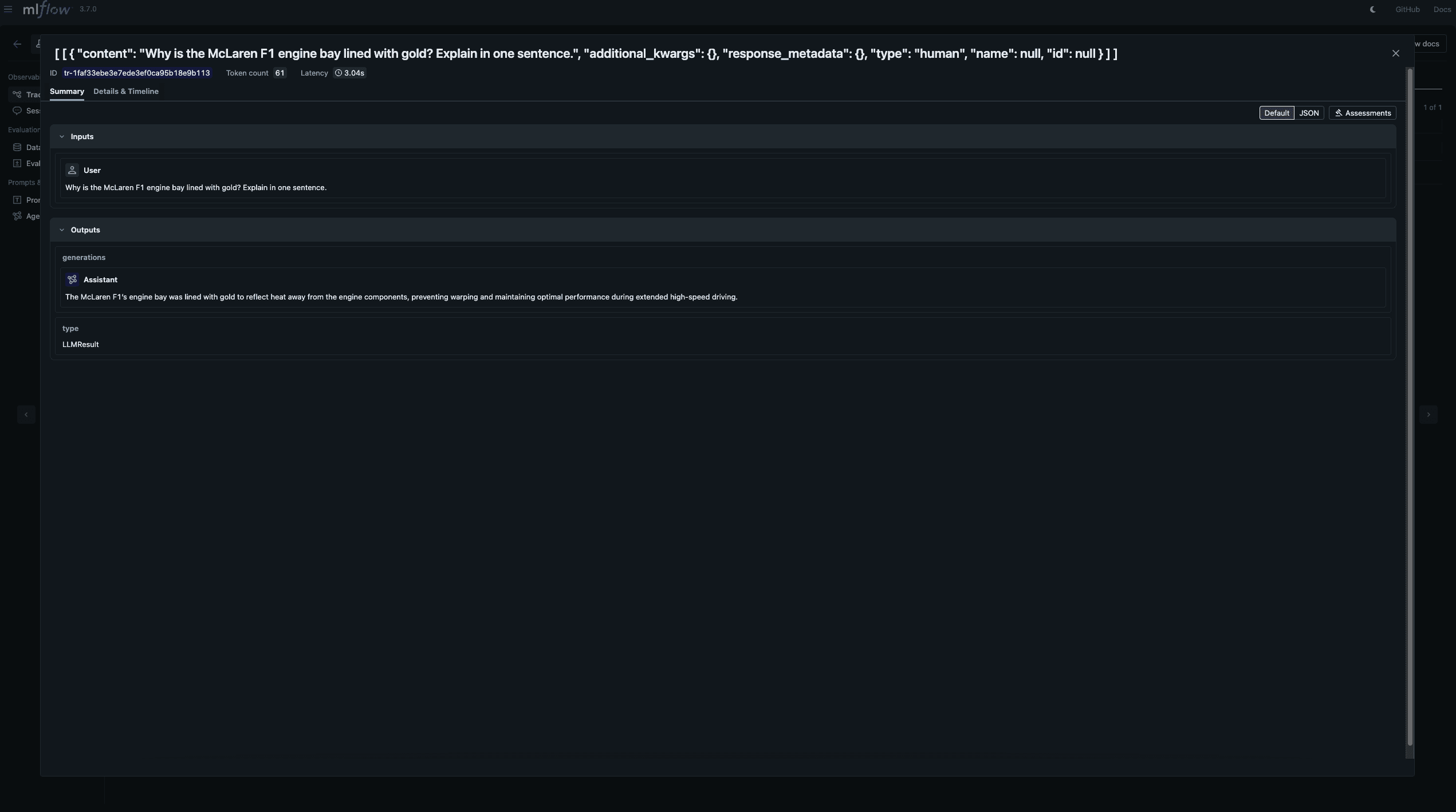
Try to run a couple of different prompts and see the trace for each one. How about if you call a tool?
Conclusion
LangChain got a lot of things wrong at the start, and it got a lot of hate from the community. But it has come a long way and is now one of the most popular libraries for building AI applications. Nothing that the library does is groundbreaking, but it provides good abstractions that will help you focus on building your application. With it you can:
- Swap Models: Switch from GPT-5 to local Qwen 3 with one line of code
- Scale Prompts: Manage complex prompt logic using templates instead of string concatenation
- Ship Features: Force models to output valid JSON using Pydantic
- Debug Workflows: Use MLflow to trace exactly what is happening inside your application
In the next tutorial, we will take these isolated concepts and combine them to build a full-fledged application: NeuroMind, a persistent, memory-enabled AI assistant that lives in your terminal.